android 视图基础
设置文本内容

代码实现:activity_text_view.xml
1
2
3
4
5
6
7
8
9
10
11
12
13
14
15
| <?xml version="1.0" encoding="utf-8"?>
<LinearLayout xmlns:android="http://schemas.android.com/apk/res/android"
android:layout_width="match_parent"
android:layout_height="match_parent"
android:orientation="vertical"
android:gravity="center">
<TextView
android:id="@+id/nk"
android:layout_width="wrap_content"
android:layout_height="wrap_content"
android:text="@string/he"/>
</LinearLayout>
|
TextViewActivity.java
1
2
3
4
5
6
7
8
9
10
11
12
13
14
15
16
17
18
| package com.luowen.chapter03;
import android.os.Bundle;
import android.widget.TextView;
import androidx.annotation.Nullable;
import androidx.appcompat.app.AppCompatActivity;
public class TextViewActivity extends AppCompatActivity {
@Override
protected void onCreate(@Nullable Bundle savedInstanceState) {
super.onCreate(savedInstanceState);
setContentView(R.layout.activity_text_view);
TextView nk= findViewById(R.id.nk);
nk.setText("开发");
}
}
|
设置文本的大小

代码实现:activity_textsize.xml
1
2
3
4
5
6
7
8
9
10
11
12
13
14
15
16
17
18
19
20
21
22
23
24
25
26
27
28
29
30
| <?xml version="1.0" encoding="utf-8"?>
<LinearLayout xmlns:android="http://schemas.android.com/apk/res/android"
android:layout_width="match_parent"
android:layout_height="match_parent"
android:orientation="vertical"
android:gravity="center" >
<TextView
android:id="@+id/kk"
android:layout_width="wrap_content"
android:layout_height="wrap_content"
android:text="@string/he"
android:textSize="30px"
/>
<TextView
android:id="@+id/tk"
android:layout_width="wrap_content"
android:layout_height="wrap_content"
android:text="@string/he"
android:textSize="30dp"
/>
<TextView
android:id="@+id/k"
android:layout_width="wrap_content"
android:layout_height="wrap_content"
android:text="@string/he"
android:textSize="30sp"
/>
</LinearLayout>
|
TextsizeActivity.java
1
2
3
4
5
6
7
8
9
10
11
12
13
14
15
16
17
| package com.luowen.chapter03;
import androidx.appcompat.app.AppCompatActivity;
import android.os.Bundle;
import android.widget.TextView;
public class TextsizeActivity extends AppCompatActivity {
@Override
protected void onCreate(Bundle savedInstanceState) {
super.onCreate(savedInstanceState);
setContentView(R.layout.activity_textsize);
TextView kk = findViewById(R.id.kk);
kk.setTextSize(120);
}
}
|
设置文本颜色

代码实现activity_text_color.xml
1
2
3
4
5
6
7
8
9
10
11
12
13
14
15
16
17
18
19
20
21
22
23
24
25
26
27
28
29
30
31
32
33
34
35
36
37
38
39
40
41
42
43
44
45
46
47
48
49
50
51
| <?xml version="1.0" encoding="utf-8"?>
<LinearLayout xmlns:android="http://schemas.android.com/apk/res/android"
android:layout_width="match_parent"
android:layout_height="match_parent"
android:orientation="vertical"
android:gravity="center">
<TextView
android:id="@+id/tv_code_system"
android:layout_width="wrap_content"
android:layout_height="wrap_content"
android:text="代码设置系统自带的颜色"
android:textSize="17sp"/>
<TextView
android:id="@+id/tv_code_eight"
android:layout_width="wrap_content"
android:layout_height="wrap_content"
android:text="代码设置8位文字颜色"
android:textSize="17sp"/>
<TextView
android:id="@+id/tv_code_six"
android:layout_width="wrap_content"
android:layout_height="wrap_content"
android:text="代码设置6位文字颜色"
android:textSize="17sp"/>
<TextView
android:id="@+id/tv_xml"
android:layout_width="wrap_content"
android:layout_height="wrap_content"
android:text="布局文件设置6位文字颜色"
android:textSize="17sp"
android:textColor="#00ff00"/>
<TextView
android:id="@+id/tv_values"
android:layout_width="wrap_content"
android:layout_height="wrap_content"
android:text="资源文件引用6位文字颜色"
android:textSize="17sp"
android:textColor="@color/green"/>
<TextView
android:id="@+id/tv_code_background"
android:layout_width="wrap_content"
android:layout_height="wrap_content"
android:text="背景设置为绿色"
android:textSize="17sp" />
</LinearLayout>
|
TextColorActivity.java
1
2
3
4
5
6
7
8
9
10
11
12
13
14
15
16
17
18
19
20
21
22
23
24
25
26
27
28
29
30
31
32
33
34
35
36
37
38
39
40
| package com.luowen.chapter03;
import androidx.appcompat.app.AppCompatActivity;
import android.graphics.Color;
import android.os.Bundle;
import android.widget.TextView;
public class TextColorActivity extends AppCompatActivity {
@Override
protected void onCreate(Bundle savedInstanceState) {
super.onCreate(savedInstanceState);
setContentView(R.layout.activity_text_color);
TextView tv_code_system = findViewById(R.id.tv_code_system);
tv_code_system.setTextColor(Color.GREEN);
TextView tv_code_eight = findViewById(R.id.tv_code_eight);
tv_code_eight.setTextColor(0xFF00FF00);
TextView tv_code_six = findViewById(R.id.tv_code_six);
tv_code_six.setTextColor(0x00FF00);
TextView tv_code_background = findViewById(R.id.tv_code_background);
tv_code_background.setBackgroundResource(R.color.green);
}
}
|
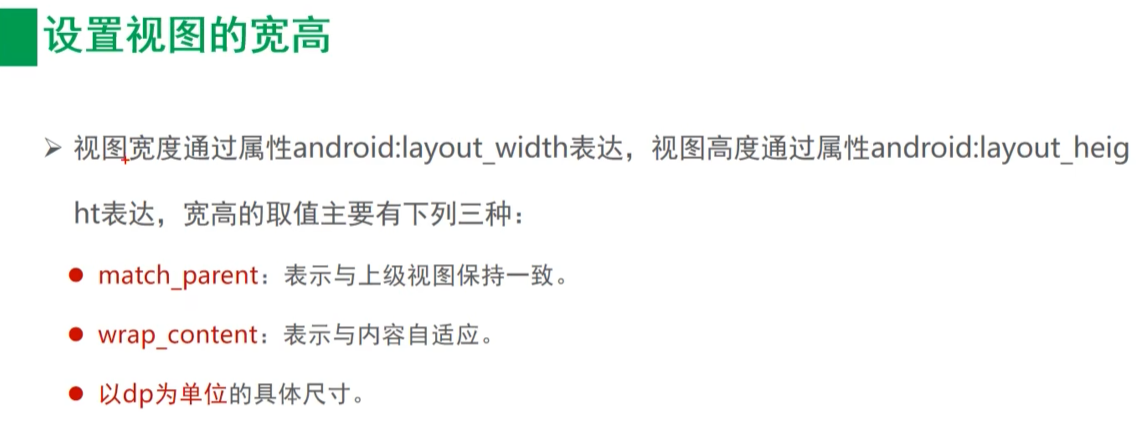
设置视图宽高
效果图
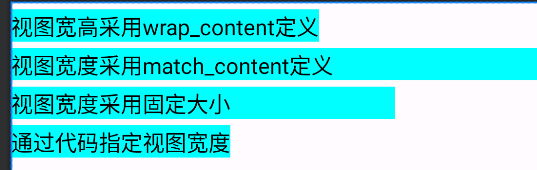
代码实现activity_view_border.xml:
1
2
3
4
5
6
7
8
9
10
11
12
13
14
15
16
17
18
19
20
21
22
23
24
25
26
27
28
29
30
31
32
33
34
35
36
37
38
39
40
41
42
43
44
45
| <?xml version="1.0" encoding="utf-8"?>
<LinearLayout xmlns:android="http://schemas.android.com/apk/res/android"
android:layout_width="match_parent"
android:layout_height="match_parent"
android:orientation="vertical"
>
<TextView
android:layout_width="wrap_content"
android:layout_height="wrap_content"
android:layout_marginTop="5dp"
android:text="视图宽高采用wrap_content定义"
android:textColor="#000000"
android:background="#00ffff"
android:textSize="17sp"/>
<TextView
android:layout_width="match_parent"
android:layout_height="wrap_content"
android:layout_marginTop="5dp"
android:text="视图宽度采用match_content定义"
android:textColor="#000000"
android:background="#00ffff"
android:textSize="17sp"/>
<TextView
android:layout_width="300dp"
android:layout_height="wrap_content"
android:layout_marginTop="5dp"
android:text="视图宽度采用固定大小"
android:textColor="#000000"
android:background="#00ffff"
android:textSize="17sp"/>
<TextView
android:id="@+id/tv_code"
android:layout_width="wrap_content"
android:layout_height="wrap_content"
android:layout_marginTop="5dp"
android:text="通过代码指定视图宽度"
android:textColor="#000000"
android:background="#00ffff"
android:textSize="17sp"/>
</LinearLayout>
|
ViewBorderActivity.java
1
2
3
4
5
6
7
8
9
10
11
12
13
14
15
16
17
18
19
20
21
22
23
24
| package com.luowen.chapter03;
import androidx.appcompat.app.AppCompatActivity;
import android.os.Bundle;
import android.view.ViewGroup;
import android.widget.TextView;
import com.luowen.chapter03.util.Utils;
public class ViewBorderActivity extends AppCompatActivity {
@Override
protected void onCreate(Bundle savedInstanceState) {
super.onCreate(savedInstanceState);
setContentView(R.layout.activity_view_border);
TextView tv_code = findViewById(R.id.tv_code);
ViewGroup.LayoutParams params= tv_code.getLayoutParams();
params.width= Utils.dip2px(this,300);
tv_code.setLayoutParams(params);
}
}
|
util/utils.java
1
2
3
4
5
6
7
8
9
10
11
12
| package com.luowen.chapter03.util;
import android.content.Context;
public class Utils {
public static int dip2px (Context context,float dpValue){
float scale = context.getResources().getDisplayMetrics().density;
return (int)(scale*dpValue+0.5f);
}
}
|
设置视图的间距

视图代码activity_view_margin.xml
1
2
3
4
5
6
7
8
9
10
11
12
13
14
15
16
17
18
19
20
21
22
23
24
25
26
| <?xml version="1.0" encoding="utf-8"?>
<LinearLayout
xmlns:android="http://schemas.android.com/apk/res/android"
android:layout_width="match_parent"
android:layout_height="300dp"
android:orientation="vertical"
android:background="#00AAFF">
<LinearLayout
android:layout_width="match_parent"
android:layout_height="match_parent"
android:layout_margin="20dp"
android:background="#FFFF99"
android:padding="60dp">
<View
android:layout_width="match_parent"
android:layout_height="match_parent"
android:background="#FF0000"></View>
</LinearLayout>
</LinearLayout>
|
设置视图的对齐方式

activity_view_gravity.xml 内容如下
1
2
3
4
5
6
7
8
9
10
11
12
13
14
15
16
17
18
19
20
21
22
23
24
25
26
27
28
29
30
31
32
33
34
35
36
37
38
39
40
41
42
43
44
45
46
47
48
49
50
51
52
53
54
| <?xml version="1.0" encoding="utf-8"?>
<LinearLayout xmlns:android="http://schemas.android.com/apk/res/android"
xmlns:app="http://schemas.android.com/apk/res-auto"
xmlns:tools="http://schemas.android.com/tools"
android:layout_width="match_parent"
android:layout_height="300dp"
android:orientation="horizontal"
android:background="#ffff99">
<LinearLayout
android:layout_width="0dp"
android:layout_height="200dp"
android:layout_weight="1"
android:layout_margin="10dp"
android:background="#ff0000"
android:padding="10dp"
android:layout_gravity="bottom"
android:gravity="left">
<View
android:layout_width="100dp"
android:layout_height="100dp"
android:background="#00ffff">
</View>
</LinearLayout>
<LinearLayout
android:layout_width="0dp"
android:layout_height="200dp"
android:layout_weight="1"
android:layout_margin="10dp"
android:background="#ff0000"
android:padding="10dp"
android:layout_gravity="top"
android:gravity="right">
<View
android:layout_width="100dp"
android:layout_height="100dp"
android:background="#00ffff">
</View>
</LinearLayout>
</LinearLayout>
|
Author:
rowen
Permalink:
https://forkmmat.github.io/2025/07/07/AndroidLearn/
License:
Copyright (c) 2019 CC-BY-NC-4.0 LICENSE
Slogan:
Do you believe in DESTINY?